# Customer Support/Connection Procedures

# Access the Horizon FTPS Server

In order to upload or download data to or from Horizon's FTPS server, Horizon customers will need to use an FTP client and authenticate using a secure account. FileZilla is a free multi-platform FTP client which can be installed and configured quickly and easily. This article will detail the process to download and install FileZilla and configure the Horizon FTPS server for customer access. Other FTP clients can be used provided they support FTP over TLS with explicit encryption.

<p class="callout info">Your Horizon FTPS credentials can be provided by your Horizon project manager. If you do not have them or they aren't working, please contact your Horizon project manager.</p>

#### Procedure

1. Download the [**FileZilla** client](https://filezilla-project.org/download.php?type=client).
2. Run the **FileZilla** client installer, accepting defaults in the wizard. Decline any optional offers during installation, such as **AVG Secure Browser**.
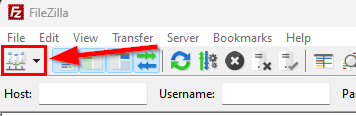
3. Run **FileZilla** and click the **Hosts** button on the toolbar:  
    [![HostsButton.png](https://wiki.horizon-is.com/uploads/images/gallery/2022-08/scaled-1680-/hostsbutton.png)](https://wiki.horizon-is.com/uploads/images/gallery/2022-08/hostsbutton.png)
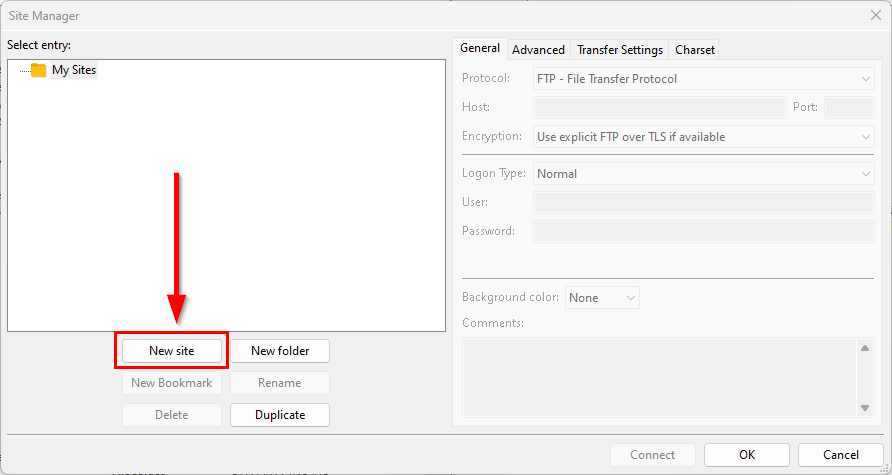
4. Click the **New site** button:[![NewSite.png](https://wiki.horizon-is.com/uploads/images/gallery/2022-08/scaled-1680-/newsite.png)](https://wiki.horizon-is.com/uploads/images/gallery/2022-08/newsite.png)
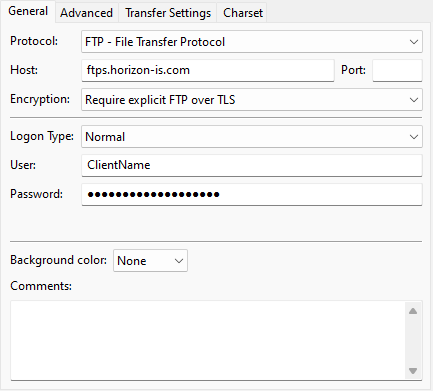
5. Enter the following information:  
    
    - Protocol: **FTP - File Transfer Protocol**
    - Host: **ftps.horizon-is.com**
    - Encryption: **Require explicit FTP over TLS**
    - Logon Type: **Normal**
    - User: **\[ClientName\]**
    - Password: **\[ClientPassword\]**  
        [![Credentials.png](https://wiki.horizon-is.com/uploads/images/gallery/2022-08/scaled-1680-/kbMcredentials.png)](https://wiki.horizon-is.com/uploads/images/gallery/2022-08/kbMcredentials.png)
6. Click the **Connect** button, choose the **Save passwords** option, and click the **OK** button.
7. If an **Unknown certificate** window appears, confirm the SSL certificate lists "ftps.horizon-is.com" in the common/alternative names, check both boxes at the bottom of the window to trust the certificate, then click the **OK** button.
8. **FileZilla** should make a secure connection to the Horizon FTPS server and place you in the customer's secure directory.
9. You can now drag-and-drop files between the local machine and the Horizon FTPS server as needed.

# Establish a Remote Support Connection

During a routine troubleshooting process, our technicians may require temporary remote access to your computer. Use this process to connect to a secure remote session a Horizon technician has prepared for you.

#### Procedure

1. Open a web browser and navigate to [https://horizon.help](https://horizon.help).
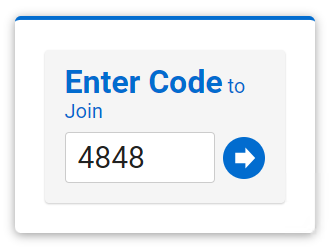
2. You will be prompted to enter a code; Your technician will provide your personal code, type the code and click the blue arrow button:  
    [![Screenshot-EnterCode.png](https://wiki.horizon-is.com/uploads/images/gallery/2024-05/scaled-1680-/WIatn4yq9xPv4gvr-screenshot-entercode.png)](https://wiki.horizon-is.com/uploads/images/gallery/2024-05/WIatn4yq9xPv4gvr-screenshot-entercode.png)
3. A file called **ScreenConnect.Client.exe** will be downloaded, click the file to run the remote connection tool.

# Setup New Horizon User

<span class="TextRun Underlined SCXW212136737 BCX8" data-contrast="auto" lang="EN-US" xml:lang="EN-US"><span class="NormalTextRun SCXW212136737 BCX8">SETUP A NEW USER</span></span><span class="EOP Selected SCXW212136737 BCX8" data-ccp-props="{"335551550":6,"335551620":6}"> </span>

<span class="TextRun SCXW212136737 BCX8" data-contrast="auto" lang="EN-US" xml:lang="EN-US"><span class="NormalTextRun SCXW212136737 BCX8">All steps are done in the HZHS16.exe program</span></span><span class="EOP Selected SCXW212136737 BCX8" data-ccp-props="{"335551550":6,"335551620":6}"> </span>

<span class="TextRun SCXW212136737 BCX8" data-contrast="auto" lang="EN-US" xml:lang="EN-US"><span class="NormalTextRun SCXW212136737 BCX8">Open the Horizon Administrator V16 module (Horizon Software &gt; Shared &gt; Programs &gt; HZHS16.exe)</span></span><span class="EOP Selected SCXW212136737 BCX8" data-ccp-props="{}"> </span>

<span class="EOP Selected SCXW212136737 BCX8" data-ccp-props="{}">(right click on a module shortcut on the desktop - select OPEN file location. then navigate to <span class="TextRun SCXW212136737 BCX8" data-contrast="auto" lang="EN-US" xml:lang="EN-US"><span class="NormalTextRun SCXW212136737 BCX8">Horizon Software &gt; Shared &gt; Programs &gt; HZHS16.exe)</span></span> </span><span class="EOP Selected SCXW212136737 BCX8" data-ccp-props="{"335551550":2,"335551620":2}"> </span>

<span class="EOP Selected SCXW212136737 BCX8" data-ccp-props="{}"> </span>

<span class="TextRun Underlined SCXW212136737 BCX8" data-contrast="auto" lang="EN-US" xml:lang="EN-US"><span class="NormalTextRun SCXW212136737 BCX8">ADD NEW USER</span></span><span class="EOP Selected SCXW212136737 BCX8" data-ccp-props="{}"> </span>

<div class="SCXW212136737 BCX8" id="bkmrk-maintain%C2%A0menu%C2%A0%3E%C2%A0user"><div class="OutlineElement Ltr SCXW212136737 BCX8">  
</div><div class="ListContainerWrapper SCXW212136737 BCX8">1. <span class="TextRun SCXW212136737 BCX8" data-contrast="auto" lang="EN-US" xml:lang="EN-US"><span class="NormalTextRun SCXW212136737 BCX8">Maintain</span><span class="NormalTextRun SCXW212136737 BCX8"> menu </span><span class="NormalTextRun SCXW212136737 BCX8">&gt;</span><span class="NormalTextRun SCXW212136737 BCX8"> </span><span class="NormalTextRun SCXW212136737 BCX8">User</span><span class="NormalTextRun SCXW212136737 BCX8"> </span><span class="NormalTextRun SCXW212136737 BCX8">Maintenance</span></span>
2. <span class="NormalTextRun SCXW212136737 BCX8">Look at another user to see the password security</span>
3. <span class="NormalTextRun SCXW212136737 BCX8">Type the new user information </span><span class="EOP Selected SCXW212136737 BCX8" data-ccp-props="{}"> </span>
    1. <span class="NormalTextRun SCXW212136737 BCX8">User Code</span>
    2. <span class="NormalTextRun SCXW212136737 BCX8">Initials</span>
    3. <span class="NormalTextRun SCXW212136737 BCX8">Last Name</span>
    4. <span class="NormalTextRun SCXW212136737 BCX8">First Name</span>
    5. <span class="NormalTextRun SCXW212136737 BCX8">Password</span>
    6. <span class="NormalTextRun SCXW212136737 BCX8">Security options matching other users</span>
    7. <span class="NormalTextRun SCXW212136737 BCX8">Administrator – check box if the user is an administrator (full access to everything)</span>
    8. <span class="NormalTextRun SCXW212136737 BCX8">Read Only ALL – check box if the user is to have view only access; cannot add/edit anything</span>
    9. <span class="NormalTextRun SCXW212136737 BCX8">Email</span>
4. <span class="NormalTextRun SCXW212136737 BCX8">Click SAVE</span><span class="EOP Selected SCXW212136737 BCX8" data-ccp-props="{}"> </span>

</div></div><span class="TextRun Underlined SCXW212136737 BCX8" data-contrast="auto" lang="EN-US" xml:lang="EN-US"><span class="NormalTextRun SCXW212136737 BCX8">COMPANY SECURITY</span></span><span class="EOP Selected SCXW212136737 BCX8" data-ccp-props="{}"> </span>

<span class="TextRun SCXW212136737 BCX8" data-contrast="auto" lang="EN-US" xml:lang="EN-US"><span class="NormalTextRun SCXW212136737 BCX8">The following instructions will </span><span class="NormalTextRun SCXW212136737 BCX8">allow access to the company files, i.e., C001, C002, etc.</span></span> <span class="EOP Selected SCXW212136737 BCX8" data-ccp-props="{}"> </span>

<div class="SCXW212136737 BCX8" id="bkmrk-security%C2%A0menu%C2%A0%3E%C2%A0comp"><div class="ListContainerWrapper SCXW212136737 BCX8">1. <span class="TextRun SCXW212136737 BCX8" data-contrast="auto" lang="EN-US" xml:lang="EN-US"><span class="NormalTextRun SCXW212136737 BCX8">Security </span><span class="NormalTextRun SCXW212136737 BCX8">menu </span><span class="NormalTextRun SCXW212136737 BCX8">&gt; </span><span class="NormalTextRun SCXW212136737 BCX8">Company</span><span class="NormalTextRun SCXW212136737 BCX8"> Security</span></span><span class="EOP Selected SCXW212136737 BCX8" data-ccp-props="{}"> </span>

</div><div class="ListContainerWrapper SCXW212136737 BCX8">2. <span class="TextRun SCXW212136737 BCX8" data-contrast="auto" lang="EN-US" xml:lang="EN-US"><span class="NormalTextRun SCXW212136737 BCX8">Company Code: select the company the user can access</span></span><span class="EOP Selected SCXW212136737 BCX8" data-ccp-props="{}"> </span>

</div><div class="ListContainerWrapper SCXW212136737 BCX8">3. <span class="TextRun SCXW212136737 BCX8" data-contrast="auto" lang="EN-US" xml:lang="EN-US"><span class="NormalTextRun SCXW212136737 BCX8">Check Valid Users: check the new </span><span class="NormalTextRun ContextualSpellingAndGrammarErrorV2Themed SCXW212136737 BCX8">user</span><span class="NormalTextRun ContextualSpellingAndGrammarErrorV2Themed SCXW212136737 BCX8"> name</span></span><span class="EOP Selected SCXW212136737 BCX8" data-ccp-props="{}"> </span>

</div><div class="ListContainerWrapper SCXW212136737 BCX8">4. <span class="TextRun SCXW212136737 BCX8" data-contrast="auto" lang="EN-US" xml:lang="EN-US"><span class="NormalTextRun SCXW212136737 BCX8">Click SAVE</span></span><span class="EOP Selected SCXW212136737 BCX8" data-ccp-props="{}"> </span>

</div></div><span class="EOP Selected SCXW212136737 BCX8" data-ccp-props="{}"> </span>

<span class="TextRun Underlined SCXW212136737 BCX8" data-contrast="auto" lang="EN-US" xml:lang="EN-US"><span class="NormalTextRun SCXW212136737 BCX8">ENABLE MODULE</span><span class="NormalTextRun SCXW212136737 BCX8">(S)</span></span><span class="EOP Selected SCXW212136737 BCX8" data-ccp-props="{}"> </span>

<span class="TextRun SCXW212136737 BCX8" data-contrast="auto" lang="EN-US" xml:lang="EN-US"><span class="NormalTextRun SCXW212136737 BCX8">The following instructions will set a module to be enabled or disabled. </span></span><span class="EOP Selected SCXW212136737 BCX8" data-ccp-props="{}"> </span>

<div class="SCXW212136737 BCX8" id="bkmrk-security-menu-%3E-modu"><div class="ListContainerWrapper SCXW212136737 BCX8">1. <span class="TextRun SCXW212136737 BCX8" data-contrast="auto" lang="EN-US" xml:lang="EN-US"><span class="NormalTextRun SCXW212136737 BCX8">Security menu &gt; Module Security</span></span><span class="EOP Selected SCXW212136737 BCX8" data-ccp-props="{}"> </span>

</div><div class="ListContainerWrapper SCXW212136737 BCX8">2. <span class="TextRun SCXW212136737 BCX8" data-contrast="auto" lang="EN-US" xml:lang="EN-US"><span class="NormalTextRun SCXW212136737 BCX8">Company Code: select the company the user can access</span></span><span class="EOP Selected SCXW212136737 BCX8" data-ccp-props="{}"> </span>

</div><div class="ListContainerWrapper SCXW212136737 BCX8">3. <span class="TextRun SCXW212136737 BCX8" data-contrast="auto" lang="EN-US" xml:lang="EN-US"><span class="NormalTextRun SCXW212136737 BCX8">User Code: select the new user</span></span><span class="EOP Selected SCXW212136737 BCX8" data-ccp-props="{}"> </span>

</div><div class="ListContainerWrapper SCXW212136737 BCX8">4. <span class="TextRun SCXW212136737 BCX8" data-contrast="auto" lang="EN-US" xml:lang="EN-US"><span class="NormalTextRun SCXW212136737 BCX8">Click </span><span class="NormalTextRun SCXW212136737 BCX8">LOOKUP SECURITY</span></span><span class="EOP Selected SCXW212136737 BCX8" data-ccp-props="{}"> </span>

</div><div class="ListContainerWrapper SCXW212136737 BCX8">5. <span class="TextRun SCXW212136737 BCX8" data-contrast="auto" lang="EN-US" xml:lang="EN-US"><span class="NormalTextRun SCXW212136737 BCX8">Installed Modules: the list of available modules will appear</span><span class="NormalTextRun SCXW212136737 BCX8">; </span><span class="NormalTextRun SCXW212136737 BCX8">MODULE SECURITY section</span><span class="NormalTextRun SCXW212136737 BCX8">: </span><span class="NormalTextRun SCXW212136737 BCX8">Click on a module name, on the right</span></span><span class="EOP Selected SCXW212136737 BCX8" data-ccp-props="{}"> </span>

</div><div class="ListContainerWrapper SCXW212136737 BCX8">1. <span class="TextRun SCXW212136737 BCX8" data-contrast="auto" lang="EN-US" xml:lang="EN-US"><span class="NormalTextRun SCXW212136737 BCX8">if nothing is checked, the user can open the module </span><span class="NormalTextRun SCXW212136737 BCX8">selected on the left</span></span><span class="EOP Selected SCXW212136737 BCX8" data-ccp-props="{}"> </span>

</div><div class="ListContainerWrapper SCXW212136737 BCX8">2. <span class="TextRun SCXW212136737 BCX8" data-contrast="auto" lang="EN-US" xml:lang="EN-US"><span class="NormalTextRun SCXW212136737 BCX8">if DISABLE MODULE is checked, the user will not be able to open the module selected on the left</span></span><span class="EOP Selected SCXW212136737 BCX8" data-ccp-props="{}"> </span>

</div><div class="ListContainerWrapper SCXW212136737 BCX8">3. <span class="TextRun SCXW212136737 BCX8" data-contrast="auto" lang="EN-US" xml:lang="EN-US"><span class="NormalTextRun ContextualSpellingAndGrammarErrorV2Themed SCXW212136737 BCX8">if</span><span class="NormalTextRun SCXW212136737 BCX8"> </span><span class="NormalTextRun SCXW212136737 BCX8">READ ONLY </span><span class="NormalTextRun SCXW212136737 BCX8">is checked, the user will </span><span class="NormalTextRun SCXW212136737 BCX8">not </span><span class="NormalTextRun SCXW212136737 BCX8">open the </span><span class="NormalTextRun ContextualSpellingAndGrammarErrorV2Themed SCXW212136737 BCX8">module, but</span><span class="NormalTextRun SCXW212136737 BCX8"> will not be able to save changes.</span></span><span class="EOP Selected SCXW212136737 BCX8" data-ccp-props="{}"> </span>

</div></div><div class="SCXW212136737 BCX8" id="bkmrk-click-save%C2%A0-the-payr"><div class="ListContainerWrapper SCXW212136737 BCX8">6. <span class="TextRun SCXW212136737 BCX8" data-contrast="auto" lang="EN-US" xml:lang="EN-US"><span class="NormalTextRun SCXW212136737 BCX8">Click SAVE</span></span><span class="EOP Selected SCXW212136737 BCX8" data-ccp-props="{}"> </span>

</div><div class="ListContainerWrapper SCXW212136737 BCX8">7. <span class="TextRun SCXW212136737 BCX8" data-contrast="auto" lang="EN-US" xml:lang="EN-US"><span class="NormalTextRun SCXW212136737 BCX8">The PAYROLL program is always automatically disabled for all users. </span></span><span class="EOP Selected SCXW212136737 BCX8" data-ccp-props="{}"> </span>

</div><div class="OutlineElement Ltr SCXW212136737 BCX8">  
</div></div><span class="EOP Selected SCXW212136737 BCX8" data-ccp-props="{}"></span>